Learn | Create | Build your future
Become a 3D Game
Character Artist
with an Industry Expert
Get hands-on training in 3D modeling, game design and more. Turn your creativity into a successful career in the fast-growing gaming industry.
Go from an AI concept to a finished 3D character or prop, fast.
Expert Mentor
Learn directly from a character artist with 10+ years in games.
Hands-on Projects
Build a strong portfolio with real game projects.
Free demo week
Try five live classes before you pay anything. See the demo →
Download tools
Speed up your work with these tools. Get them →
THE PROGRAMME
Build your first game-ready character
Learn the complete character art pipeline the way it is actually used in production — sculpting in ZBrush, building clean topology in Maya, rendering and validating your model in Marmoset, and bringing it to life inside Unreal Engine. Every session is live and interactive, and you get full recordings of each class to revisit any time.
With more than ten years building characters for games and cinematics, I built this course to teach exactly what I wish someone had shown me early in my career — not just theory, but the real workflow, real problem-solving and real production habits. If you are a beginner or intermediate character artist trying to break into the industry, this is where to start.
Module breakdown
-
01
Getting Started
Pipeline overview, software setup, and how to plan a character project from the ground up.
-
02
AI for Characters & Game Development
Using AI to explore character and prop concepts fast, turning an AI concept into a clear, buildable 3D plan, and where AI fits in modern game development.
-
03
Base Meshes & Blockout
Building foundational forms in ZBrush and Maya, establishing proportions before detail work begins.
-
04
High-Detail Sculpting
Sculpting armour, fabric, props and surface detail with production-ready ZBrush techniques.
-
05
Facial Anatomy & Head Sculpting
Head construction, facial proportions, likeness and skin detailing.
-
06
Retopology & UVs
Building game-ready topology in Maya and efficient UV layouts for texturing.
-
07
Texturing for Real-Time
Baking maps, PBR texturing workflows, and achieving production-quality surfaces.
-
08
Marmoset Rendering & Look Development
Lighting, material validation, and presenting your model at its best.
-
09
Unreal Engine Integration
Importing your character, setting up materials, hair and eyes, and getting your model in-engine.
-
10
Final Polish & Portfolio Presentation
Posing, rendering final shots, and packaging your work for ArtStation and job applications.
Roles this prepares you for
- Junior 3D Character Artist
- 3D Artist Intern
- Texture / LookDev Artist (Junior)
- Prop Artist (Starter)
- Game Art Intern
Software covered
GET THE SOFTWARE
Download the tools before class starts
Three of these are free, so you can start today. The rest offer free trials — install them in the week before the module that uses them, so the trial lasts.
Blender
Modelling, sculpting and rendering
Get it FreePureRef
Reference boards while you work
Get it Free to learnUnreal Engine
Real-time engine for your final character
Get it Paid · free trialAutodesk Maya
Retopology and UV layout
Get it Paid · free trialZBrush
High-detail sculpting
Get it Paid · free trialSubstance 3D Painter
PBR texturing
Get it Paid · free trialMarmoset Toolbag
Rendering and look-development
Get it Paid · free trialAdobe Photoshop
2D foundations and texture work
Get itLinks go to each company's official site. Prices, trials and student licences are set by them and can change — check there before you buy.
FREE 1-WEEK DEMO CLASS
One free week. Five live classes.
Five real classes, Monday to Friday. You follow one simple prop through the pipeline, see exactly how the course is taught, and decide for yourself.
- MondayHow the pipeline works, then reference and blockout
- TuesdaySculpting the main forms
- WednesdayBuilding a clean low-poly version
- ThursdayUVs and a quick texture
- FridayRender, plus feedback on your prop
You leave with a simple finished prop and a clear idea of whether the one-year programme is right for you.
Launch offer — 1+1 free. Bring a friend into the same batch at no extra cost.
ON COMPLETION
Finish the programme, get certified
Every student who completes the one-year programme receives a VasuPixel Certificate of Completion, issued with a unique certificate ID and signed by your mentor.
- Names the specific skills you covered, not just a course title
- Carries a unique ID so an employer can verify it with us
- Issued digitally as a PDF you can attach to applications
- We keep a record of every ID issued, so a certificate can be checked with us
Your portfolio is what gets you hired. The certificate supports it — it is awarded by VasuPixel and is not a government or university accreditation.
MEET YOUR MENTOR
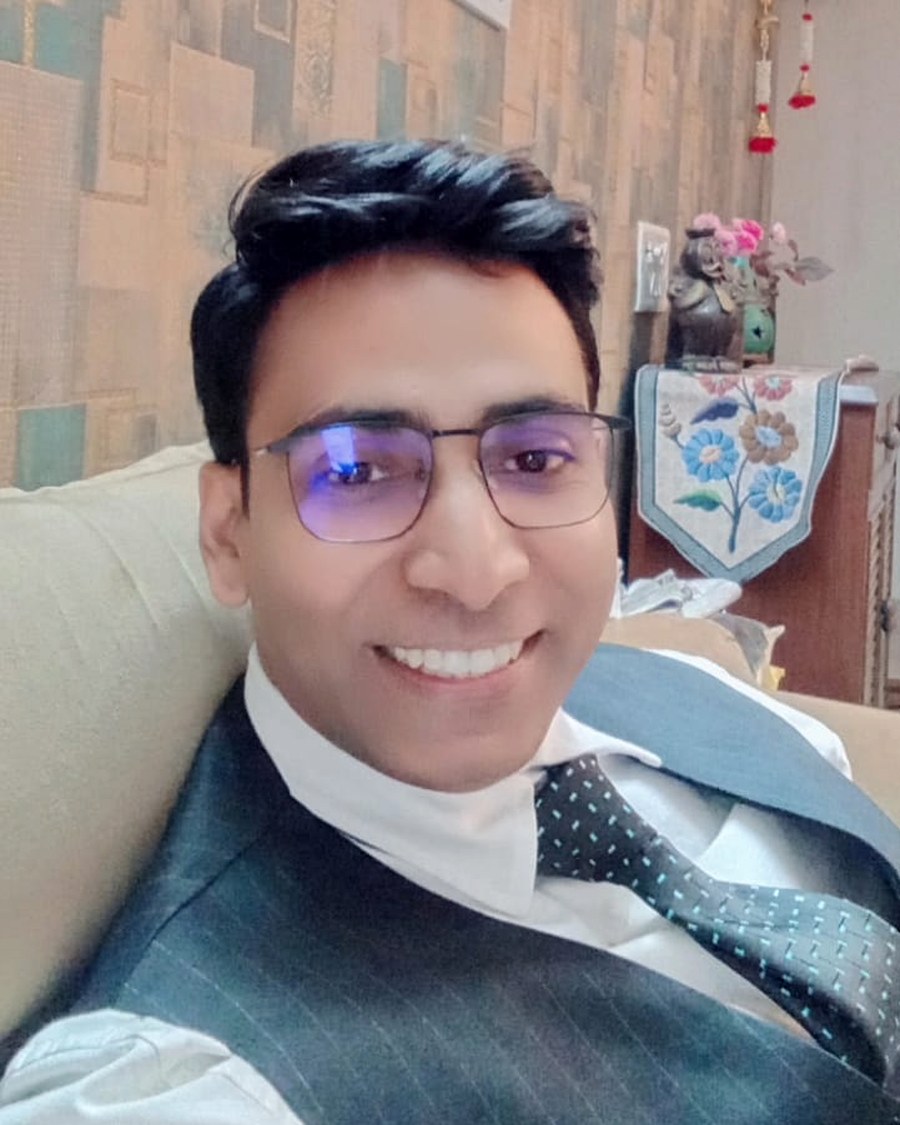
Taught by a working character artist
I'm Ankit Singh, a 3D character artist and game designer with over ten years in games and cinematics. For seven years I was an Associate Art Lead at Lakshya Digital, guiding artist teams, running quality reviews and delivering game art for global titles under real-time engine constraints.
I still take client work today. What VasuPixel teaches is not a syllabus written from textbooks — it is the workflow I use on live projects, from concept through sculpt, retopology, UVs and PBR texturing to final presentation.
- 10+years in games & cinematics
- 7 yrsAssociate Art Lead, Lakshya Digital
- 5.0rating from 43 client reviews
- 4countries of client work
Specialities — realistic, stylized and semi-realistic characters · creature, armour and mecha modelling · retopology, UV unwrapping and baking · PBR texturing · optimisation and LODs · Marmoset rendering
FROM CONCEPT TO GAME ENGINE
The workflow studios actually use
We don't just teach you how to use 3D software; we teach you how assets are actually built in the professional gaming industry. Here is one character through all six stages.
Concept art
The design brief — silhouette, colour and story locked in before a single polygon exists, whether it starts as a sketch or an AI concept.
ZBrush sculpt
Every fold, seam and buckle is sculpted at full detail first. No shortcuts at this stage.
Clean topology
The sculpt is rebuilt with clean quads so the mesh deforms correctly once it is rigged and animated.
UV unwrapping
The mesh is cut and flattened so textures sit on it without stretching or visible seams.
PBR in Substance
Base colour, roughness, metalness and normal maps authored in Adobe Substance 3D Painter.
Game-ready asset
The finished asset, lit and presented from every angle — the piece that goes in a portfolio.
STUDENT GALLERY
Work built by our students
Sculpts, textures and game-ready assets produced during the course. Hover overTap any piece to see it larger.
AT THE END OF THE YEAR
What you walk away with
Not a folder of lesson videos. A finished piece of work, the workflow behind it, and the tools to do it again on your own.
-
01
A portfolio-ready character
Sculpted, retopologised, textured, lit and rendered — one finished piece you can put in front of a studio.
-
02
Every session recorded
Replays posted within about two hours — and they never expire. Yours to keep.
-
03
Free assets that outlast the course
Base meshes and reference packs built to keep using long after the programme ends.
-
04
The full production toolchain
ZBrush, Maya, Substance 3D Painter, Marmoset Toolbag and Unreal Engine — the software studios actually run.
-
05
Direct access to your mentor
Live, interactive classes three evenings a week. Ask questions while the work is on screen.
-
06
A verifiable certificate
Issued with a unique ID we keep on record, so an employer can check it with us.
WHAT STUDENTS SAY
Feedback from our students
I recently completed my 3D Masterclass with Ankit Singh, and it was a really great learning experience. I learned a lot, improved my skills, and got a much better understanding of the 3D workflow.
 Ajay3D Masterclass student
Getting feedback from Ankit Singh feels like having a senior studio lead review your assets. He doesn’t let sloppy topology, bad silhouettes, or uncalibrated PBR values slide—he actively trains your eye to spot the tiny flaws that separate amateur models from production assets. That level of technical rigor is rare to find and completely transformed the quality of my portfolio.
 AshishVasuPixel student
Learning 3D with Mr. Ankit Singh at VasuPixel has been an incredible experience. Unlike traditional institutes that just teach software shortcuts, he focuses on how production is actually handled in the industry. He patiently explains the reasoning behind modeling, topology, and sculpting rather than just telling you which buttons to press. His industry-grade feedback has noticeably leveled up my skills and problem-solving. Highly recommended!
 MansisVasuPixel student
Client work is reviewed publicly on Fiverr — 5.0 from 43 reviews.
QUESTIONS
Things students ask before joining
Do I need any 3D experience to join?
No. The programme is built for beginners. We start with software setup and pipeline basics, then build up to full character production. If you already have some 3D experience, you will move faster through the early modules and spend more time on sculpting and texturing.
What software will I need?
Adobe Photoshop, Blender, PureRef, Autodesk Maya, ZBrush, Substance 3D Painter, Marmoset Toolbag and Unreal Engine. Course fees do not include software licences — you are responsible for obtaining your own, whether free, trial, student or commercial.
What kind of computer do I need?
At minimum: Windows 10/11 or macOS 12+, a quad-core processor, 16 GB RAM, a dedicated graphics card with 4 GB VRAM, and 60 GB free SSD space. ZBrush and Substance are demanding, so 32 GB RAM and an RTX 3060 make the work much more comfortable. Message us before enrolling if you are unsure — we will tell you honestly.
When are the classes?
Monday, Wednesday and Friday, 6:00–8:00 PM IST, for twelve months. All classes are live on Zoom — about 150 sessions in total.
What if I miss a class?
Every session is recorded and the replay is posted within about two hours. Recordings never expire — you keep them for good, so missing a session never means falling behind.
Which language are classes taught in?
Both. Classes are taught in a mix of Hindi and English, and the technical terms stay in English because that is how they appear in the software and in studio work. Ask questions in whichever language you are comfortable with.
How do I pay?
By UPI or bank transfer. Fees are discussed directly by phone or in person and confirmed in writing before you pay. Keep your payment reference — it is how we match a payment to your enrolment.
Can I try before I commit?
Yes. The demo week is free — five live classes, Monday to Friday, where you take one simple prop from blockout to a textured render. You keep what you make whether or not you continue.
Do I get a certificate?
Yes. Students who complete the one-year programme receive a VasuPixel Certificate of Completion with a unique ID that we can verify on request. It is awarded by VasuPixel and is not a government or university accreditation.
Will this get me a job?
The programme prepares you for junior roles — 3D Character Artist, Texture/LookDev Artist, Prop Artist, Game Art Intern. We do not guarantee employment or placement. What gets you hired is your portfolio, which is exactly what this course is built to produce.
What if I need to stop partway through?
You will not be charged for future months. Our full refund policy is on the terms and conditions page.
REGISTER
Book your free demo week
Fill this in and we will message you on WhatsApp with the next batch dates and your demo class timings. It takes about a minute.
- Five live classes, Monday to Friday
- No payment and no card details needed
- Beginners welcome — no 3D experience required
You're registered, .
We will message you on WhatsApp soon with batch dates and your demo timings.
Message us now on WhatsApp
Your Dream Gaming CareerStarts Here
Join VasuPixel Gaming Institute and turn your passion into a profession.
Enroll NowADMISSIONS
Talk to us
Questions about upcoming 3D production batches, course fees or the online curriculum? Message us on WhatsApp. Programmes are 100% online with interactive digital mentorship, so you can build an industry-ready portfolio from anywhere.
Message us on WhatsAppVasuPixel
- ADDRESS
- Munirka, New Delhi, Delhi, India
- PHONE
- +91 99589 98715
- contact@vasupixel.com
- HOURS
- 09:00 am – 05:00 pm